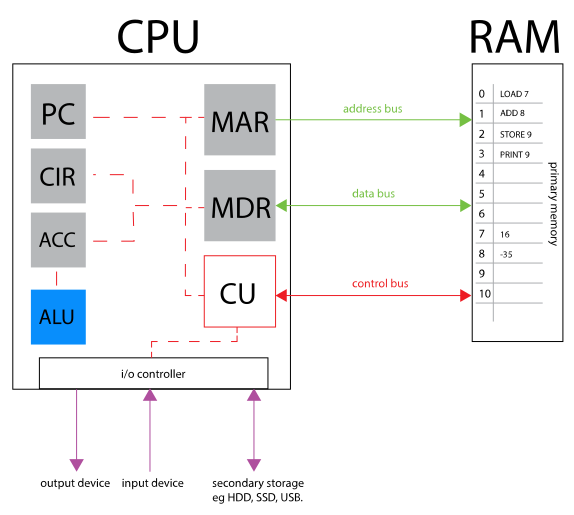
2.1.1 Outline the architecture of the central processing unit (CPU) and the functions of the arithmetic logic unit (ALU) and the control unit (CU) and 2 registers in the CPU, memory address register (MAR) and memory data register (MDR).
2.1.2 Describe and distinguish between primary memory (RAM AND ROM)
2.1.3 Explain the use of cache memory
2.1.4 Explain the fetch-decode-execute cycle
Secondary Storage
Modern devices use Solid State Drives (SSD) for data storage. SSD is non-volatile. This means the storage is persistent, even after you turn your computer off.
Non-volatile data storage devices also include HDD (Hard Disk Drives) and EMMCs (embedded multimedia cards).
HDD is older than HDD and relies on a spinning disk. It requires a fan to stay cool. SSD has no moving parts.
If you need extra memory, you can purchase external storage devices such as:
external SSD: offers fast, durable and compact additional memory with high capacity
external HDD: slower, heavier, noisier than SSD, but cheaper
optical drives (eg CDs and DVDs): need special software to burn data onto the disk.
flash drives (USB sticks): fast and convenient, but not as fast as SSD and lower capacity than SSD
network attached storage devices: dedicated storage devices connected to a network, fast and secure
Note: non-volatile memory is often referred to as SECONDARY STORAGE.
The devices listed above are SECONDARY STORAGE DEVICES
Primary Storage
When you open a program on your device, it is loaded into RAM.
RAM is volatile memory. This means that when you close the program, all data is lost (unless you save it onto secondary storage, eg SSD).
RAM is connected directly to the CPU. Memory connected to the CPU is known as PRIMARY MEMORY.
Other examples of primary memory are:
ROM: non-volatile memory storing startup instruction for your computer.
Cache: volatile memory which is located closer to the CPU than RAM. Stores frequently used instruction, speeding up processing.
Cache comes in 3 common forms: L1, L2 and L3 cache.
Translators
A computer program written in a high level language like Java needs to be translated into a low-level language like machine code that the computer can understand.
There are two types of translators:
Compilers
Interpreters
A compiler translates the entire code into machine code first. This creates a fast, standalone executable file.
An interpreter translates and execute code line-by-line at runtime, hence offers slower performance than when using a compiler.
Registers
Registers are small blocks of volatile memory in the CPU.
The CPU uses them to temporarily store instructions and data as a program is being executed.
How it uses them can be confusing to us humans!
In this unit, we will discover the purpose of each register.
computer architecture
Scenario
On your computer are loads of applications (which are basically computer programs) stored on your device's .
When you open one of these applications, it is loaded into .
Let's imagine a super simple application, TenAddThree. It has been written in Python. Here is the original code.
x = 10
y = 3
result = x+y
print(result)
To run on your computer, the Python needs to be into a low-level programming language, such as assembly language.
Here is TenAddThree written in assembly language:
LOAD 32
ADD 33
STORE result
DISPLAY result
Note: in this example, 32 and 33 are a memory addresses which store values eg 10 and 5.
When we run the program, the CPU:
Fetches the first instruction from RAM
Decodes the instruction by analysing the Opcode and Operand
Executes the instruction
It repeats this cycle for each instruction associated with the program loaded into RAM.
This is known as the FETCH-DECODE-EXECUTE cycle.
It sounds pretty straightforward, but nothing is strightforward in computer science!
Continue to the Worksheet Task
RAM and the CPU
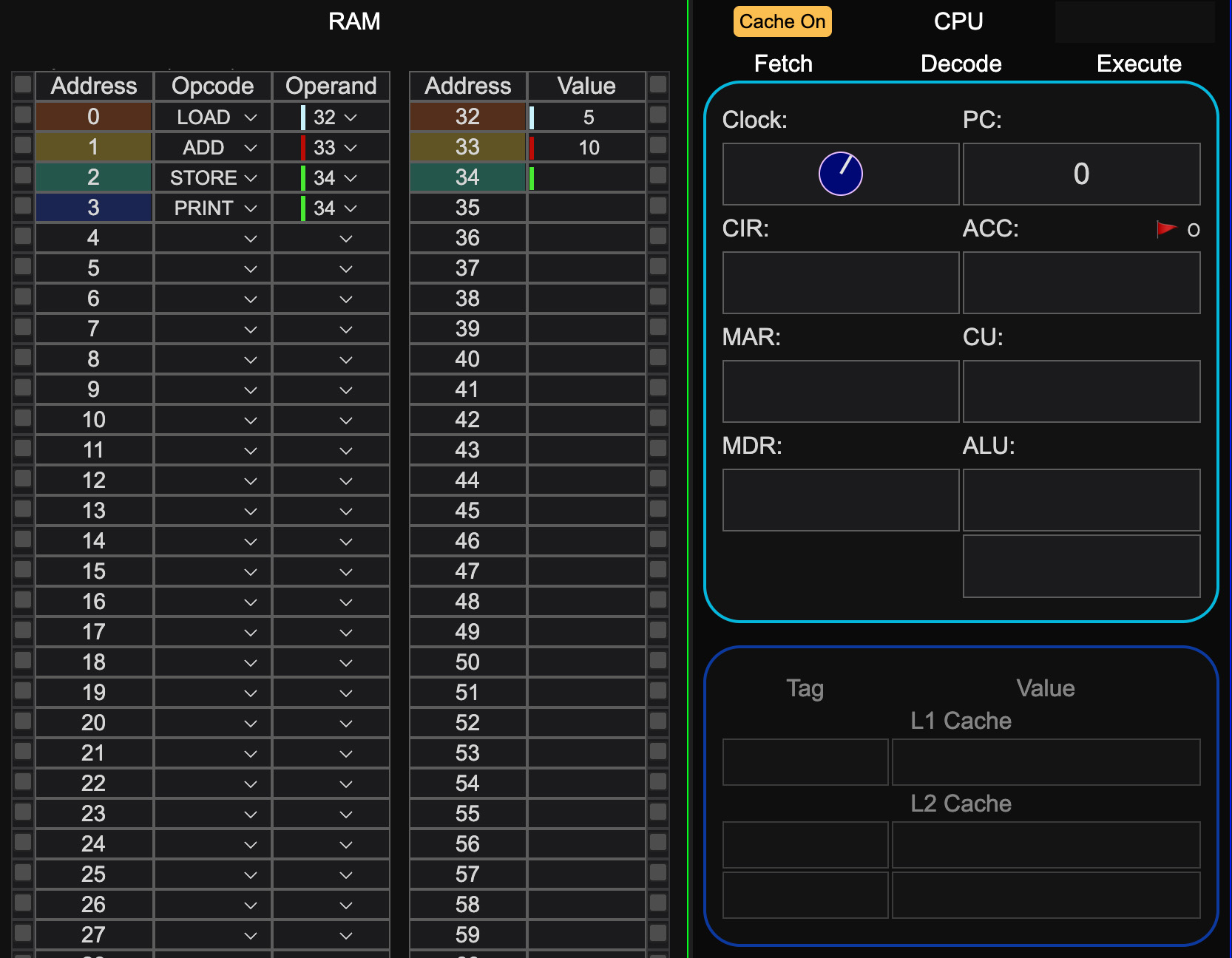
Here is a visual of RAM and the CPU when the above program is loaded:
Notice RAM stores both instructions and values at different addresses.
The program starts at address 0.
In RAM, a special called the Program Counter (PC) will store this starting address as the process of executing the program begins.
Continue to the worksheet task.
Worksheet Task
We will be using simulator in the worksheet.
Food For Thought
Your cpu is truly amazing. It has a very high clock speed measured in bps (bits per second) meaning it can do many tasks very quickly. But it can only do one task at a time.
Alex November 16
My head is spinninnnnnng...
Alison November 14
So how can it show video and play sound at the same time?