Objectives

Students will be able to:

  • understand the nature of pipelining in the Fetch Decode Execute cycle.

Secondary Storage

Modern devices use Solid State Drives (SSD) for data storage. SSD is non-volatile. This means the storage is persistent, even after you turn your computer off.

Non-volatile data storage devices also include HDD (Hard Disk Drives) and EMMCs (embedded multimedia cards).

HDD is older than HDD and relies on a spinning disk. It requires a fan to stay cool. SSD has no moving parts.

If you need extra memory, you can purchase external storage devices such as:

  • external SSD: offers fast, durable and compact additional memory with high capacity
  • external HDD: slower, heavier, noisier than SSD, but cheaper
  • optical drives (eg CDs and DVDs): need special software to burn data onto the disk.
  • flash drives (USB sticks): fast and convenient, but not as fast as SSD and lower capacity than SSD
  • network attached storage devices: dedicated storage devices connected to a network, fast and secure

Note: non-volatile memory is often referred to as SECONDARY STORAGE.

The devices listed above are SECONDARY STORAGE DEVICES

Primary Storage

When you open a program on your device, it is loaded into RAM.

RAM is volatile memory. This means that when you close the program, all data is lost (unless you save it onto secondary storage, eg SSD).

RAM is connected directly to the CPU. Memory connected to the CPU is known as PRIMARY MEMORY.

Other examples of primary memory are:

  • ROM: non-volatile memory storing startup instruction for your computer.
  • Cache: volatile memory which is located closer to the CPU than RAM. Stores frequently used instruction, speeding up processing.

Cache comes in 3 common forms: L1, L2 and L3 cache.
Translators

A computer program written in a high level language like Java needs to be translated into a low-level language like machine code that the computer can understand.

There are two types of translators:

  1. Compilers
  2. Interpreters

A compiler translates the entire code into machine code first. This creates a fast, standalone executable file.

An interpreter translates and execute code line-by-line at runtime, hence offers slower performance than when using a compiler.

Registers

Registers are small blocks of volatile memory in the CPU.

The CPU uses them to temporarily store instructions and data as a program is being executed.

How it uses them can be confusing to us humans!

In this unit, we will discover the purpose of each register.

Pipelining

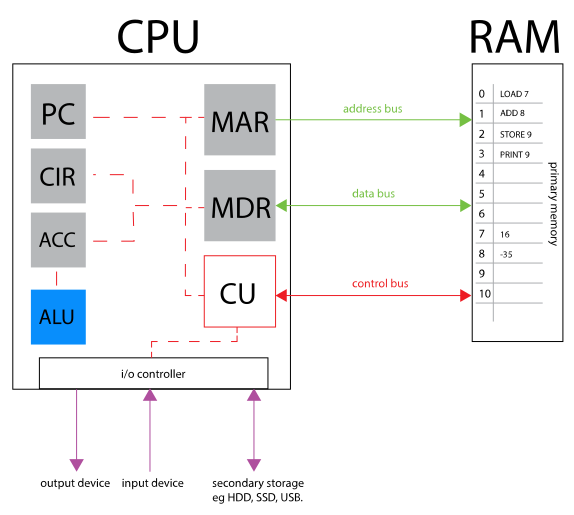
Discuss the image with a classmate(s).

How well can you describe the purpose of each register and bus.

Can you recall the steps of the following:

  • fetch
  • decode
  • execute

Pipelining (HL Only)

Computure architecture is designed in a way to make things as fast as possible.

Even the Fetch-Decode-Execute cycle, which takes advantage a cache to speed up the process, has another neat trick called pipelining.

In a pipelined processor, once the first instruction moves from the fetch stage to the decode stage, the fetch stage becomes free to start working on the next instruction.

So while one instruction is being decoded, the next instruction is already being fetched, and a third could soon be entering the pipeline behind them.

This overlap is what makes pipelining efficient: multiple instructions are in progress at the same time, each at a different stage. It’s a bit like an assembly line—each stage is busy working on a different item simultaneously, which increases overall throughput.

Write-back (HL Only)

In multi-core architecture, different cores may need access to the same data stored in a register or in main memory (RAM) while they are pipelining their own Fetch-Decode-Execute cycle.

It is imperitive that the data is always up to date.

So, another stage is added to Fetch-Decode-Execute. This is the Write-back stage.

The write-back stage is the final step of the instruction pipeline, where the result of an operation is written back to a register or main memory.

Including a dedicated write-back stage helps improve overall system performance because it allows earlier stages (fetch, decode, execute) to continue processing new instructions without waiting for results to be stored.

In multi-core architectures, this separation is especially important, as multiple cores may be executing instructions simultaneously and need efficient access to updated data.

By organizing write-back as its own stage, the system can maintain a steady flow of instructions through each core’s pipeline, increasing throughput while ensuring that computed results are properly stored and made available for subsequent operations.