linked lists
a dynamic data structure
Singly Linked Lists
Linked Lists are fundamentally a list of Nodes.
Each Node stores data and a pointer to the next Node in the list.
Click the button to see the Node class.
Observations
- Every Node object will store an integer as data
- Every Node object has a pointer to the next Node in the list, or null
- Accessor and Mutator methods are used to manipulate the properties of a Node object
Note: we don't have to make the properties private for this study. But we will anyway!
Let's Build a Singly Linked List
Let's build a singly linked list in Java.
Each new Node will be inserted at the end of the list.
The following video will demonstrate this using the Node class above, and also demonstrate how to display data in each Node.
Insert at the start
Now that we know how to traverse a list, and build a list by adding Nodes to the end of the list, what if we had to insert a Node at the start of the list?
We would still need to consider the scenario where the list is empty, which makes the insert easy.
In your IDE, design a function called insertAtStart and see if you can figure out how to implement the function.
Here is a sample program based on the code used when we built a list above.
                            static Node root;
                            public static void main(String[] args){

                                insertAtStart(new Node("Cat"));
                                insertAtStart(new Node("Dog"));
                                insertAtStart(new Node("Tiger"));
                                insertAtStart(new Node("Elephant"));

                                displayList();

                            }

                            public static void insertAtStart(Node newNode){

                                //your code
                            }

                            public static void displayNodes(){

                                Node searchPointer = root;

                                while(searchPointer!=null){

                                    System.out.println(searchPointer.getData());

                                    searchPointer = searchPointer.getNext();
                                }
                            }
Inserting into the middle of a Singly Linked List
Let's consider how to insert a new node into an ordered singly linked list of car manufacturers:
- First create a new Node to store the data, "Ferrari"
- Next, starting at the head of the list, traverse the list until the correct insertion point is found.
- Update the new node's pointer to point to the node at the insertion point - ie Honda. This can be determined by refering to the previous node's ("Chrysler") next pointer.
- Update the pointer of the node previous to the insertion point - ie Chrysler - to point to the new node.
Note! practically it can be tricky to insert into a singly linked list because we need to know where the Node previous to the insertion point is in order to update its next pointer. A doubly linked list (see below) helps solve this problem.
However, in case it turns up in an exam, let's look at how to insert in the middle of a singly linked list!
Test the solution by calling the function several times and displaying the result eg:
                    static Node root;
                    public static void main(String[] args){
                        root=null;
                        insertInOrder(new Node("Ford"));
                        insertInOrder(new Node("Jaguar"));
                        insertInOrder(new Node("Audi"));
                        insertInOrder(new Node("Ferrari"));

                        displayList();
                    }
Deleting from a Singly Linked List
Similar to inserting:
- starting at the head, traverse the list by following pointers until the node being searched for eg Honda is found.
- Update the pointer of the node previous to the deletion point so that it is the same as the node to be deleted's pointer.
Note! Practically, this is also tricky when processing a singly linked list. A doubly linked list (see below) helps solve this problem.
Deleting the first node is a little different. All we have to do is assign the external root/head pointer to the first node's next pointer eg root = root.getNext();
Coding Task
Code the method removeFromList which takes a String as a parameter. Here is code to test your solution:
                    static Node root;
                    public static void main(String[] args){
                        root=null;
                        insertInOrder(new Node("Ford"));
                        insertInOrder(new Node("Jaguar"));
                        insertInOrder(new Node("Audi"));
                        insertInOrder(new Node("Ferrari"));
                        displayList();

                        removeFromList("Audi");
                        displayList();
                    }
Doubly Linked Lists
A linked list whose nodes have a pointer to the previous node AND the next node is called a doubly linked list.
Note, an external pointer is still required to point to the first node of the list.
The first node's previous pointer will point to null.
The last nodes next pointer will point to null.

geeksforgeeks
Because there is a previous pointer, it is easier to insert and remove items from a doubly linked list.
For example, check out this code for inserting an integer at the end of a list of integers:
    public static void addNodeToList(Node newNode){
        //is the list empty?
        if(root==null){
            root = newNode;
            return;
        }

        //create a search pointer
        Node searchPointer = root;

        //traverse the list until the last node
        while(searchPointer.getNext()!=null){
            searchPointer = searchPointer.getNext();
        }

        //make the new node the end of the list
        searchPointer.setNext(newNode);

        //update the new node's previous pointer, too
        newNode.setPrevious(searchPointer);
    }
Notice that the only difference from our singly list solution is that we have to update the previous pointer of the new node.
Doubly Linked - Inserting
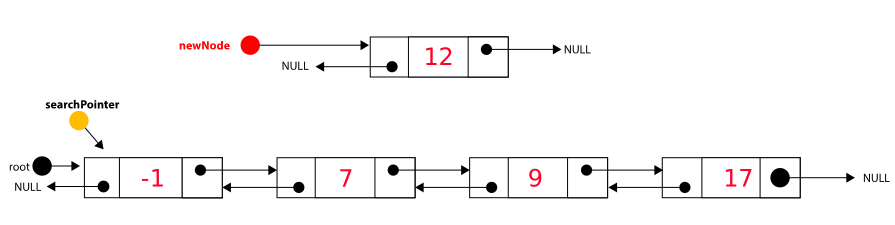
What about inserting into a doubly-linked list?
There may be several strategies for this.
The following video will cover one of the cleanest which involves 4 stages:
- Is the list empty?
- Is the new item the smallest? Insert at root
- Is the new item the biggest? Insert at end
- None of the above is true, insert in correct place
Can you get the code working?
How about searching for and removing an item from a Doubly Linked List?
Design a function called removeNode which takes an integer as a parameter.
Build a list and then try and remove a particular Node(s).
Circular Lists
In a circular list the next pointer of the last node in the list points back to the head of the list.
Operating systems use circular linked lists to assign time to different processes, for example in the Round Robin scheduling algorithm.
The following video introduces how to insert a Node at the end of a circular list and covers a wierd quirk in displaying list data!
Extension
Set up the scenario in your IDE.
Can you figure out how to:
- add/remove the first Node in the list
- remove the last Node in the list
- search for and remove a Node in the list, eg the Node containing the Ferrari model Car reference?
Review and Exam Questions
Take a moment to go through the review sheet.
Then you will encounter some exam questions. Attempt them - but don't peek at the answers at the very end of the document until you have tried...
Advantages of linked lists (see geeksforgeks link)
Dynamic memory allocation: Linked lists allow for dynamic memory allocation, meaning that the size of the list can change as elements are added or removed. This is different from static arrays whose size/length must be pre-determined and cannot be changed.
Space-efficient: linked lists are space-efficient, as they only need to store a reference to the previous/next node in each element, rather than a large block of contiguous memory.
Inserting nodes into a doubly linked list is relatively easy because after finding the insertion point, we have the address of the previous and next node to allow an easy insert. Singly linked lists can be a little more complicated in this regard.
It is complicated to insert items into a static array (requires shuffling) wheres linked lists simply require the pointer(s) to be updated when inserting or deleting nodes.
Disadvantages of linked lists
Poor random or direct access performance: Accessing an element in a linked list requires traversing the list from the head to the desired node, making it slow for random or direct access operations compared to arrays.
Increased memory overhead: Singly linked lists require additional memory for storing the pointers to the next node in each element, resulting in increased memory overhead compared to arrays.
Vulnerability to data loss: Singly linked lists are vulnerable to data loss if a node’s next pointer is lost or corrupted, as there is no way to traverse the list and access other elements.
In singly linked lists, backward traversing not possible.
Linked lists cannot take advantage of Binary Search, a fast searching algorithm.