Procedures
A procedure is also a block of code that can be called by a computer program.
The difference between a procedure and a function is that a procedure does not return anything to the calling program.
It just does what it is supposed to do and when it has finished, the program continues from the procedure call.
Scenario
A company wants a program that will display step-by-step instructions on how to assemble its products.
As an example, the company wants you to produce a program that will display the following instructions for assembling an Eazi-Make Box Seat.
- Unpack the base of the seat.
- Unpack the 4 legs of the seat.
- Unpack the back of the seat.
- Find the set of screws and and fix each leg of to the base of the seat where indicated.
- Use the final 2 screws to fix the back of the seat to the base where indicated.
Before the instructions are displayed, a start-up message is needed, and the user will press enter to see each instruction one by one.
In this rather simple example, we are going to create a procedure to display each step.
Note, there could be some functions in the design, but in this example there aren't any.
Our program will call each procedure in turn.
We are approaching the solution by using top down design - the main task is broken down into subtasks.
It could be that each subtask is examined to determine if it they can be broken down into further subtasks.
Finally, when no further subtasks can be identified, coding can begin.
So, in this simple example, our top down design can be illustrated by a heirarchy chart as follows:
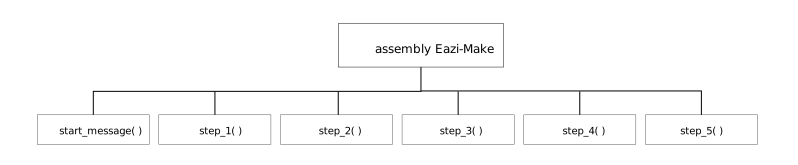
Now that we have a design, as illustrated by a heirarchy chart, let's get coding!
def start_message():
print("Welcome to this installation guide.")
input("Press enter to continue.")
def step_1( ):
print("Unpack the base of the seat.")
input("Press enter to continue.")
def step_2( ):
print("Unpack the 4 legs of the seat.")
input("Press enter to continue.")
def step_3( ):
print("Unpack the back of the seat.")
input("Press enter to continue.")
def step_4( ):
print("Find the set of screws and and fix each leg of to the base of the seat where indicated.")
input("Press enter to continue.")
def step_5( ):
print("Use the final 2 screws to fix the back of the seat to the base where indicated.")
input("Press enter to continue.")
#main program
#call start_message()
start_message( )
#call step_1()
step_1( )
#call step_2()
step_2( )
#call step_3()
step_3( )
#call step_4()
step_4( )
#call step_5()
step_5( )
Code this design.
Does it work?
Would it work if there were no procedures and no procedure calls? Just line after line of code?
So what are the advantages of using top down design to break a task down into subtasks and further subtasks until coding can begin?
Tags
module procedure return identifier parameter pseudocode return typedefinecalldata type