2-dimensional arrays

Drivers for a racing team complete test circuits. They complete 3 test circuits every day from Monday to Friday. The team monitors how many times a driver uses the in-car radio to report a problem. This data is stored and analysed. Here is a sample table of data:
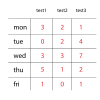
We can see that the data stored uses the same data type - int. So, to help us manage the data we should use an array. We can also see that the data is easily understandable in a tabular format - we can imagine a table or a spreadsheet would be useful to store the data. In many computer programming languages, including Java, we can create a 2-dimensional array to store this data.
2-dimensional arrays have a number of rows and a number of columns. In the above example, there are 5 rows and each row has 3 columns.
Notes
So, we can see that the data set has 5 rows and each row has 3 columns.
Also, the data set has only 1 identifier, dataSet
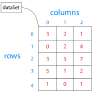
So, dataSet[3][1] has a value of...?
How convenient!
Our data structure has 1 identifier - dataSet
We don't need to create 5 individual arrays, each with a different identifier!
The data structure stores the data and if we understand indexes, we can mess around with the stored data.
We can use a NESTED FOR LOOP to allow us to visit each element in the array. First visit a row and then visit all of the columns in that row and then visit the next row etc.
Python Sample
OK - here's the bad news. In Python, indexes start at 0, not 1.
Fill the blanks and check. Do you get it?!
rainfall = [
[2.3, 14.7, 4.1, 9.3],
[2.0, 12.0, 13.2, 7.9],
[3.3, 11.5, 9.2, 8.7]
]
max = 0
for i in range():
for j in range():
if rainfall[][] > max:
= rainfall[i][j]
print(f"The maximum amount of rainfall is {max}.")
print("End of program.")
Tags
iterateauto-indent variablecompile sum machine code count-controlled loop integer pseudocodesyntax