sensors activity
A Mars rover is being developed.
Scientists have already determined that landing craft will land 557mm from a large rock.
The rover will need to move forward until it is 100mm away from that rock and then activate the brake and stop and await further instructions.
The rover will use a location sensor to do this.
The rover has a stored value called maxDistance to help it determine its location from the rock.

Simulation
Here is a screenshot of the simulation arena that the scientists are using. Follow these setup instructions:
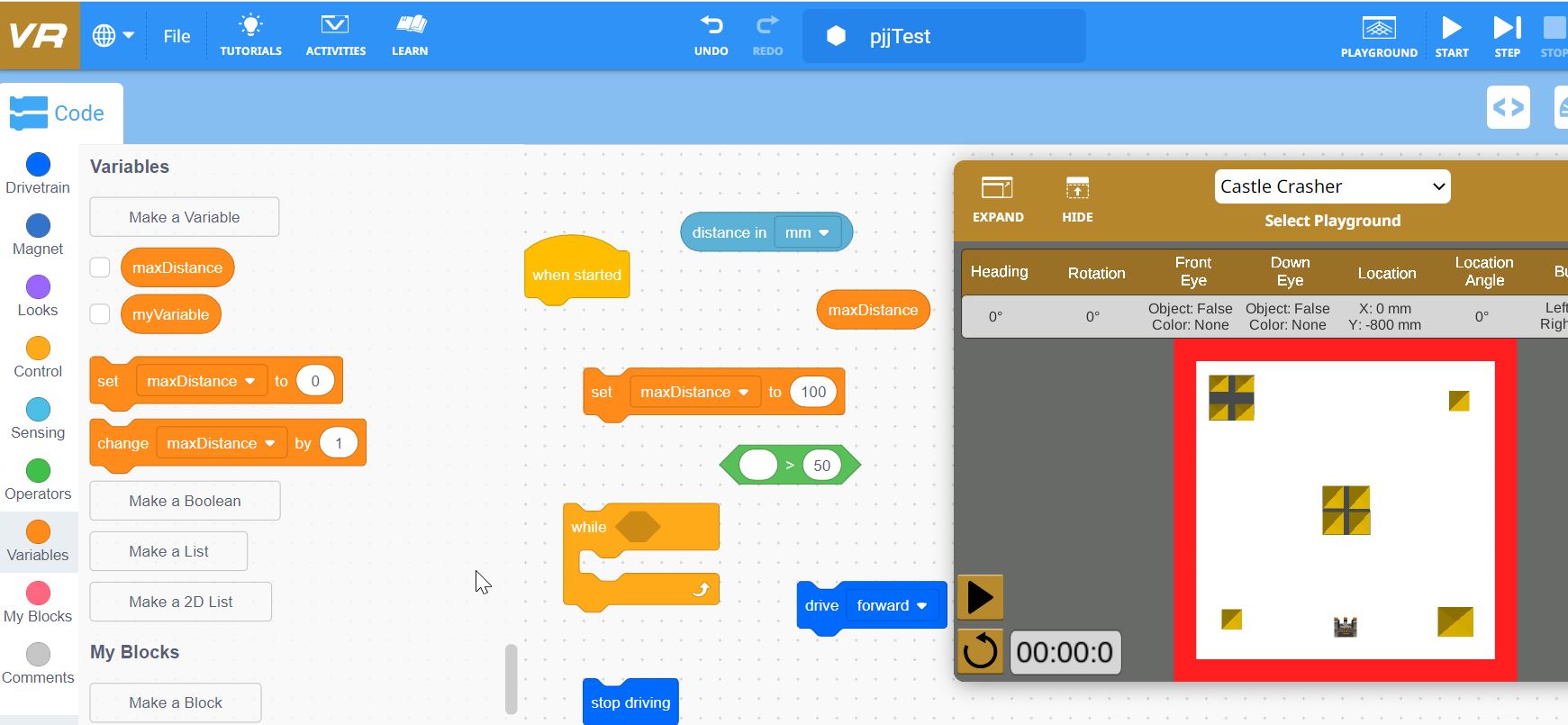
- Go to this simulator application.
- Click Playground and select Castle Crasher.
- Set up a variable (stored value) called maxDistance.
- See if you can find all of the different code blocks as displayed above.
Task 1
Write a program that will allow the rover to keep driving until its location sensor tells the microprocessor that it has reached the stored value of 100. It will then stop driving and wait for further instructions.
Task 2
Open a Google Doc.
Paste a screenshot of your solution to the above problem.
Write a paragraph describing how the sensor system works. You do not need to include details about the computer program - just describe the concept of how this sensor system works. Include these words:
location sensorbrakestored valuemicroprocessorcompare
analogue-to-digital convertercontinuously
Note: Other common sensors include:
- P_ sensor
- m_t_on sensor
- te_p_ra_ure sensor
- _ig_t sensor
- ma_ne_ic fiel_ sensor
- p__ss_re sensor
- m_is_ure sensor
- _umi_ity sensor