You are a data analyst working for an expanding car sales company.
Today you are handling data relating to monthly car sales. You are designing a spreadsheet model to help track the monthly sales.
You will need this csv file to help you set up the model.
Follow these instructions carefully:
Delete Column A
In the second row of the Sales Price column, enter a formula to calculate the Sales Price. The formula is:
Price + (Price*Sales Tax)
Copy down this information for the other cells in the Sales Price column.
At the very bottom of the Sales Tax column, enter the text Total Sales Price
At the very bottom of the Sales Price column, create a formula to calculate the Total Sales Price of all car sales.
Insert a column between Sales Price and Sales Code. Name this column Price Difference
At the top of the Price Difference column in row 2, enter a formula to calculate the difference between the Price and the Sales Price.
The formula is Sales Price - Price
Copy-down the formula to the bottom of the Price Difference column.
In the Summary Data section, complete the 3 formulae for MIN, MAX and AVERAGE Sales Price in the spreadsheet.
In the Summary Data section, use the countif function to calculate how many E320 and Mondeo cars were sold.
In the Summary Data section, use the averageif function to calculate the average sales price of E320 and Mondeo cars.
Create the following pie chart:
Note: your numbers may be different.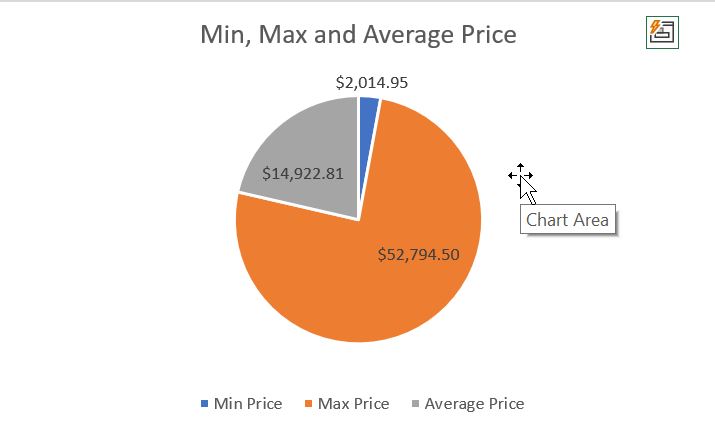
Make sure:
- Your chart has the same title as the example
- Data labels are on or next to the pie chart slices
- There is a legend
Insert a new row at the top of the spreadsheet.
Merge the cells in the range A1:G1 and insert a title Car Sales this month
Format any currency data in the spreadsheet as Japanese Yen.
Format any decimal numbers to 2 decimal places.
You have reached the end of this spreadsheet assessment. Submit your spreadsheet model as instructed.
Do the next steps very carefully
If you are using EXCEL, save your spreadsheet as an Excel Workbook. DO NOT save it as a csv file!
Upload your assessment folder to Google Drive and submit a link to this folder into Google Classroom.
If you are using Google Sheets, submit to Google Classroom directly.