Ab$olute reference$

Find cell D18. How do you think that number was calculated? Click to find out.
But... what will happen if we copy down this formula to complete the summary data? Click to find out.
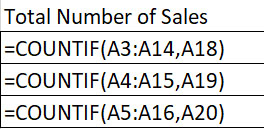
So, in certain situations we need to lock some cell references in a formula before we copy down. As the designer, you need to figure out which references need to be locked. These are called absolute references.
To fix a reference, simply attach a dollar sign infront of the cell's letter and number cell reference. What do you think we need to change the formula in cell D18 above before we copy down? Click for the answer.
Task
If you are using Google Sheets, use this sheet.
If you require a csv file to get started, download this one.
Follow these instructions to develop the spreadsheet model:
Merge the 4 cells of the title of the summary data section. Center-align the title and make it bold with a red background.
Make sure all data in your spreadsheet model is visible.

Reproduce this combo chart (sometimes called a clustered chart). Note, 2 data sets are represented and there is a secondary axis.

Submit your final spreadsheet file as instructed. BEWARE of saving your work in a CSV file - all of your formatting, functions and chart will be lost!!
Food For Thought
Copy down is a convenient feature of spreadsheet software. However, it cannot predict which cell references need to be fixed/locked/absolute. You, the designer, should have experience to make that decision. Hopefully this course is giving you that experience!


Homework
Tags
spreadsheet data csv model merge insert row format currency column range decimal places cell reference