More complex functions
| A | B | C | ||
|---|---|---|---|---|
| 1 | Country | Item | Cost | |
| 2 | Somalia | Clothes | ||
| 3 | Mozambique | Baby Food | ||
| 4 | Bangladesh | Office supplies | ||
| 5 | Somalia | Office supplies | ||
| 6 | Rwanda | Baby Food | ||
| 7 | Sri Lanka | Personal care | ||
| 8 | Sri Lanka | Clothes | ||
| 9 | Somalia | Personal care | ||
| 10 | Summary Data | |||
| 11 | Item | Total cost | ||
| 12 | Baby Food | 0 | ||
| 13 | Office supplies | 0 | ||
| 14 | Clothes | 0 | ||
| 15 | Personal Care | 0 |
The spreadsheet above has been designed to allow users to add and edit data. It also has a Summary Data set which updates automatically.
For example, in cell c12 there is a function that does this:
- It looks in the item column in the range b2:b9
- if it finds the criteria Baby Food, it then finds the corresponding value in the Cost column.
- It then adds the value to the current sum.
In order for this function to work correctly it needs to know where to look (the range), what to look for (the criteria) and which range to find the corresponding sum value.
= sumif(range, criteria, sum_range)
In the above example, the function can be designed as:
= sumif(b2:b9,"Baby Food",c2:c9)
We could also do this:
= sumif(b2:b9,b12,c2:c9)
Thought: could we use copy down to complete c13:c15?
There are other spreadsheet functions that will do calculations based on criteria. If the criteria is found, the data will be processed.
Task
If you are using Google Sheets, use this sheet.
If you require a csv file to get started, download this one.
Follow these instructions to develop the spreadsheet model:
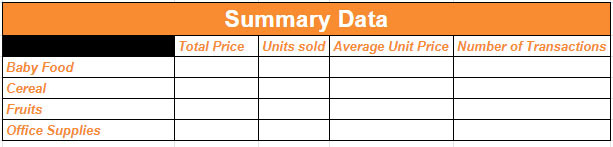

Make sure all data in your spreadsheet model is visible.
Submit your final spreadsheet file as instructed. BEWARE of saving your work in a CSV file - all of your formatting, functions and chart will be lost!!
Food For Thought
To be successful with a new concept in any technology, you should be comfortable with the vocbulary. Words like range, criteria and function will help you to describe what you want to say when talking about spreadsheet technology. Understanding these terms will also help you deal with instructions, too.
How would you describe what criteria means when discussing spreadsheet functions?



Homework
Tags
spreadsheet data csv model merge insert row format currency column range decimal places cell reference